The office is down, so the right engineer is told in minutes.
Sage answers for a sample IT support firm. It separates a whole-office outage or security incident from everyday requests, creates the ticket, and escalates the urgent ones to an engineer.
Tallowood IT Support is a fictional business. Everything on this page is sample content.
A sample call, start to finish
- It says it is an automated assistant, up front.
- It checks it can help before taking any details.
- It reads details back before acting.
- It never promises prices, arrival times or repair advice.
- It hands over to a person when it matters.
Sample conversation with a fictional business, written as the agent runs it. A recorded call will be added once the agent is on a live line.
Six jobs it takes off the front desk
Sorts P1 from the rest
Whole office offline, servers or email down, or a suspected security incident is P1. Several people stuck is P2. One person with a workaround is P3.
Creates the ticket
Name, company, what is affected, how many people, and when it started. The reference is read back slowly and sent by text.
Escalates P1 at any hour
Transfers to the service desk in hours and the on-call engineer after hours.
States the response target
From the client's agreement. It never promises a fix time.
Takes new starter and access requests
Who it is for, what is needed and by when, as a routine ticket.
Passes on new client enquiries
Collects company details and asks the account manager to call back. No prices on the phone.
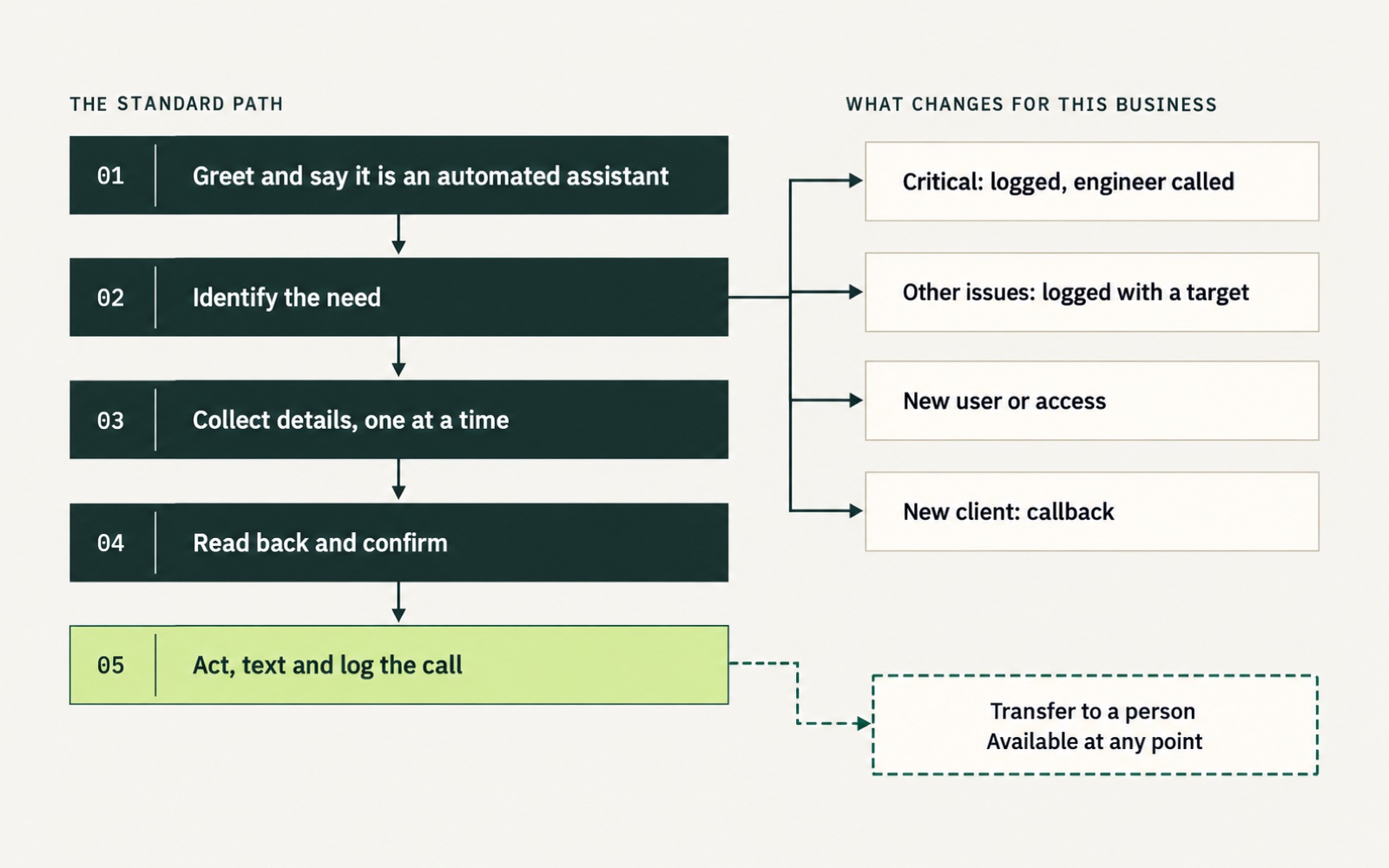
How every call runs
The same five steps every time. The paths on the right are what changes for this business.
Built-in limits
What we need from you
The assistant is the same for every business. What changes is a short profile of yours: hours, services, rules and who to call.
- Your priority definitions and response targets
- Escalation numbers: service desk, on-call engineer, account manager
- Your ticketing tool, or a shared sheet to start with
- How you identify a client by company name
- The wording for suspected security incidents, agreed with you
- Your call recording wording, checked for your state
Want this answering for your business?
15 minutes, no slides. We will tell you honestly whether it suits you.